Guides & resources
What Is an SOP? Definition and How to Write One
What SOP stands for and how to write one: a step-by-step guide, a free SOP template and a filled-in example that teams actually use in daily work.
How to Write Effective SOPs in 2026 (Free Template + Examples)
Learn how to create effective SOPs with a free template, real examples, and a step-by-step guide for modern teams.
What Is an SOP? (Meaning Explained)
An SOP (Standard Operating Procedure) is a documented, step-by-step set of instructions for how to carry out a specific task or process so the result is consistent, safe, and compliant.
In practice, SOPs answer one simple question: “How do we do this here?” When that knowledge is written down in a clear way, teams can train faster, reduce mistakes, and avoid relying on memory or informal shortcuts.
If you run a restaurant and want a practical example of restaurant SOPs that actually get used, read: why more restaurants are switching to Todolo.
Why Most SOPs Fail
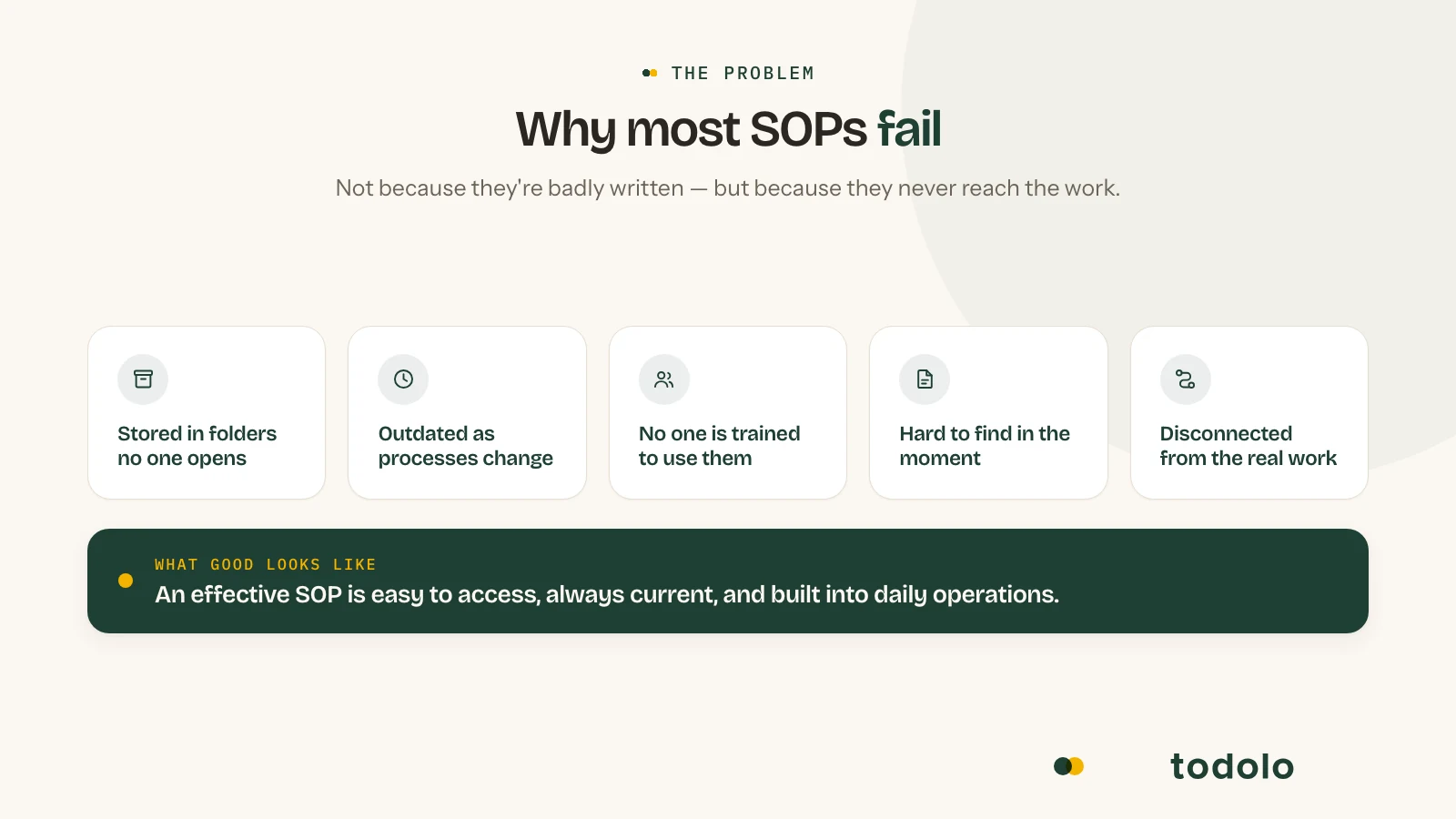
Creating an SOP is often the easy part. Making sure it is actually followed is where many organizations struggle.
Many businesses invest time documenting processes, only to find that employees continue to rely on old habits, informal communication, or tribal knowledge.
Common reasons why SOPs fail include:
-
Procedures are stored in folders that employees rarely access.
-
SOPs become outdated as processes evolve.
-
Employees are not trained on how and when to use them.
-
Information is difficult to find when needed.
-
SOPs are disconnected from the workflows where work actually happens.
An effective SOP should not be treated as a static document. It should be easy to access, regularly updated, and integrated into daily operations so that following the process becomes part of the workflow itself.
SOPs and Operational Debt
One of the most overlooked consequences of poor process management is operational debt.
Operational debt builds up when important knowledge, routines, and procedures exist only in the minds of employees instead of being documented and shared across the organization.
As businesses grow, this creates challenges such as:
-
Inconsistent execution
-
Longer onboarding periods
-
Increased dependency on key individuals
-
Reduced operational visibility
-
Difficulty maintaining quality across locations
Well-structured SOPs help reduce operational debt by turning individual knowledge into organizational knowledge.
Instead of relying on specific employees to remember how tasks should be completed, SOPs create a shared standard that helps teams work consistently and scale more effectively.
Digital SOPs vs Traditional SOPs
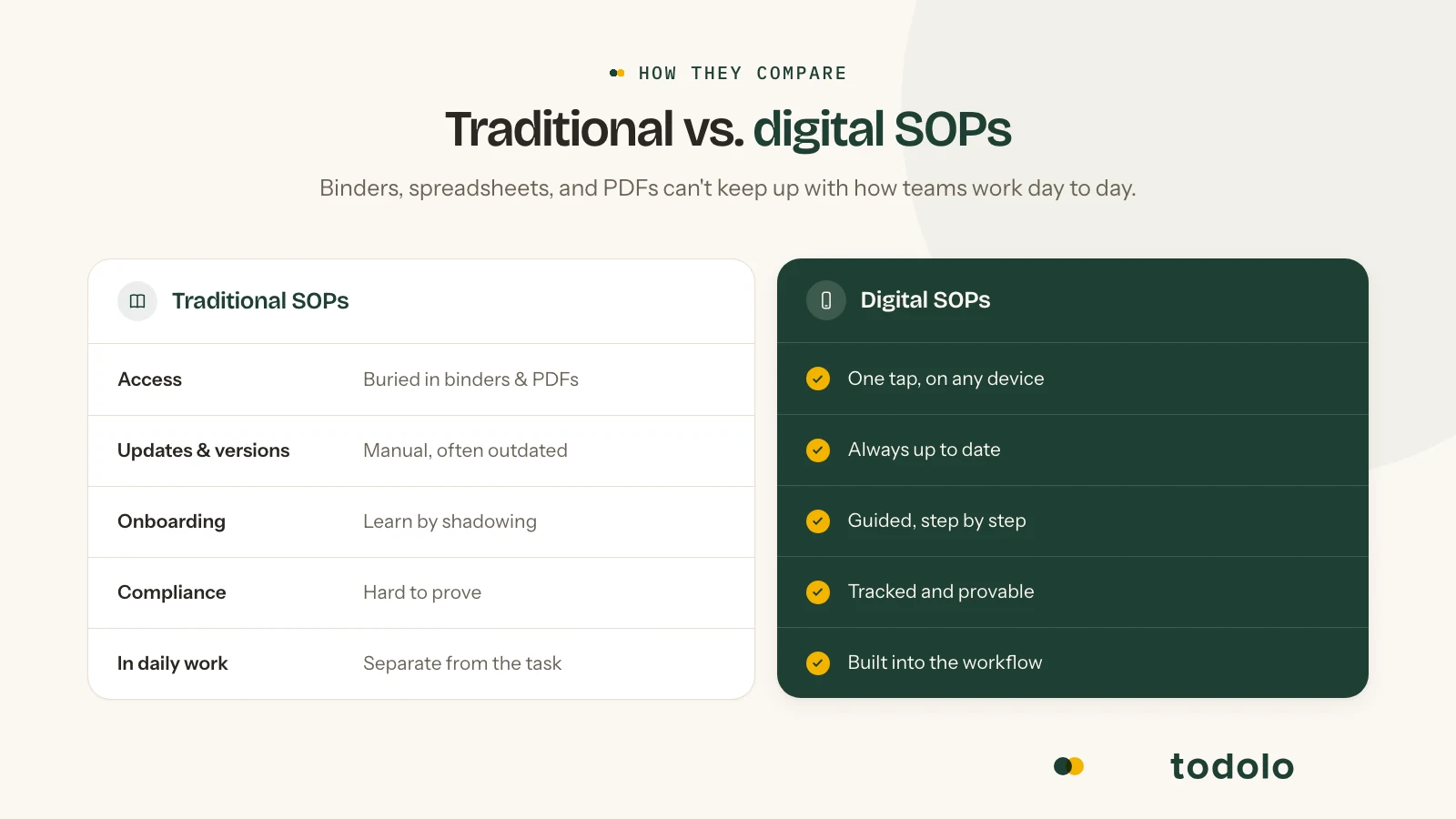
Traditionally, SOPs were stored in binders, spreadsheets, PDFs, or shared folders. While these formats can work, they often become difficult to maintain as organizations grow.
Digital SOP management offers several advantages:
-
Faster access to procedures and instructions
-
Easier updates and version control
-
Improved onboarding for new employees
-
Better visibility into process compliance
-
Integration with workflows, tasks, and operational activities
For organizations with multiple teams, locations, or departments, digital SOPs can help ensure that processes remain consistent and accessible across the entire business.
When SOPs are connected to workflow automation, onboarding and training, internal controls, and operations management, they move from documentation to execution.
SOPs your team actually uses
In 20 minutes, we’ll show you how to build, follow, and improve SOPs, without the complexity.
Book a 20‑min call → View Operations ↗
Free SOP Template (With Example)
To help you create standard operating procedures faster, here’s a free SOP template you can use for almost any process in your business.
It’s intentionally simple and practical, so your team can follow it in real day-to-day work.
You can use it for:
-
Operations and internal workflows
-
Employee onboarding
-
Customer support processes
-
Compliance and quality control
SOP Template
Use this structure when creating your SOPs:
Document title: [Name of procedure]
Document ID: SOP-XXX-001
Version: 1.0
Effective date: [Date]
Owner: [Role or name]
1. Purpose
[One or two sentences: why this procedure exists and what it achieves.]
2. Scope
[Where and when it applies; which roles, sites, or products.]
3. Definitions
[Any terms or abbreviations used in the procedure.]
4. Responsibilities
-
Performer: [Who does the steps.]
-
Reviewer/Approver: [Who checks or approves.]
5. Prerequisites
-
Training: [Required training.]
-
Equipment/Materials: [List.]
-
Other: [Conditions that must be met.]
6. Procedure
| Step | Action | Notes / Warnings |
|---|---|---|
| 1 | [First action.] | [If any.] |
| 2 | [Second action.] | [If any.] |
| 3 | [Continue…] |
7. Deviations and corrective action
[What to do if a step cannot be followed or something goes wrong. Who to notify.]
8. References
[Policies, regulations, or other SOPs.]
9. Revision history
| Version | Date | Author | Summary of changes |
Use Todolo to Set Up and Run SOPs
If you want SOPs to be followed consistently, they need to be easy to access and easy to complete during a busy day.
With Todolo you can keep SOPs in one place, control versions, and turn key steps into checklists and recurring routines your team actually completes.
SOP Example (Filled In)
Below is the same template, filled in. Copy the structure first, then adjust the content to match your process and requirements.
Document title: Daily fridge and freezer temperature checks
Document ID: SOP-OPS-012
Version: 1.2
Effective date: 2026-01-15
Owner: Site Manager
1. Purpose
Ensure fridge and freezer temperatures are checked and logged daily so food is stored safely and deviations are caught early.
2. Scope
Applies to all refrigeration and freezer units at the site. Completed at opening every day, and repeated after maintenance, power outages, or when a unit is suspected to be faulty.
3. Definitions
-
Limit (fridge): 0 to +4°C
-
Limit (freezer): -18°C or colder
-
Deviation: A measured value outside the defined limits
4. Responsibilities
-
Performer: Shift Lead (or assigned opener)
-
Reviewer/Approver: Site Manager (weekly review of logs and follow-up on deviations)
5. Prerequisites
-
Training: Basic food hygiene and deviation handling
-
Equipment/Materials: Access to unit displays, calibrated probe thermometer when needed, temperature log (digital or paper)
-
Other: Keep unit doors closed for 10 minutes before checking if there has been heavy traffic
6. Procedure
| Step | Action | Notes / Warnings |
|---|---|---|
| 1 | Confirm units are running and doors seal properly. | If a door gasket is damaged, treat as a risk and report immediately. |
| 2 | Read and record the displayed temperature for each unit. | Note any alarms, unusual noise, or visible icing. |
| 3 | If a display is missing or seems unreliable, measure using a probe in a representative product. | Measuring product is more stable than measuring air. |
| 4 | Log date, time, unit ID, temperature, and initials. | Use the same naming for each unit every day. |
| 5 | If a deviation is found, follow the actions in section 7 before continuing normal operations. | A deviation must be handled, not just noted. |
7. Deviations and corrective action
If the fridge is above +4°C or the freezer is warmer than -18°C:
-
Check if a door was left open or stock was just loaded. Wait 10 minutes and re-check.
-
Move sensitive items to a working unit if the temperature does not return to normal.
-
Label potentially affected items and notify the Site Manager for a decision on disposal.
-
Create a maintenance/service ticket and record what was done in the log.
-
For significant deviations or suspected food safety risk, stop using affected items and follow your food safety procedure.
8. References
-
Internal routine for deviation handling and maintenance reporting
9. Revision history
| Version | Date | Author | Summary of changes | | 1.2 | 2026-01-15 | Todolo Team | Clarified limits and added power outage checks. |
Why This SOP Template Works
A good SOP template isn’t just about documentation. It has to be usable.
This structure works because it:
-
Keeps instructions clear and actionable
-
Makes ownership visible
-
Is easy to update over time
The best SOPs are the ones your team actually uses, not the ones that sit in a folder.
If you want help turning SOPs into routines your team actually follows, you can book a quick demo of Todolo.
Why SOPs Matter: Consistency, Safety, and Compliance
Well-written SOPs deliver measurable benefits. Work gets standardised so quality and output stay consistent no matter who does the task. Safety and compliance steps are spelled out, which cuts risk and matters especially in regulated environments. New hires have one place to look, so training time drops. When experienced staff leave, the knowledge stays. And when auditors or regulators ask how you do things, you have clear evidence to show them.
For these reasons, knowing how to create an SOP (and how to write one that people actually use) is a core skill for operations and quality teams.
SOP Format: What a Standard Structure Looks Like
A strong SOP format follows a clear structure so that any reader can quickly find purpose, scope, and steps. There is no single mandatory SOP format, but most effective SOPs include these sections:
1. Title and document control
-
Title: Clear, specific name of the procedure (e.g. “SOP: Handwashing and Sanitisation for Food Handling”).
-
Document ID and version so you can track revisions.
2. Purpose and scope
-
Purpose: Why the procedure exists and what outcome it supports.
-
Scope: Where it applies (which sites, roles, or situations) and any limits.
3. Definitions and references
-
Definitions: Any terms or abbreviations that might be unclear.
-
References: Links to policies, regulations, or other SOPs.
4. Roles and responsibilities
- Who is responsible for performing, checking, and approving the procedure.
5. Prerequisites
- Training, equipment, materials, or conditions that must be in place before starting.
6. Step-by-step procedure
-
Numbered steps in the order they must be performed.
-
One action per step, in plain language.
-
Warnings or safety notes where relevant.
7. Handling deviations and exceptions
- What to do if something goes wrong or doesn’t match the normal situation.
8. Revision history
- Who changed what and when, so the SOP remains a reliable record.
This SOP format works for both simple and complex procedures. You can shorten or expand sections depending on the task and your audience.
What Makes SOPs Effective in 2026?
Most SOPs fail not because they’re wrong, but because they’re not used.
SOPs have changed a lot in recent years.
In the past, they were often static documents that were created once and rarely updated. Today, the most effective SOPs are dynamic, accessible, and built for real execution.
From Static Documents to Living Workflows
Traditional SOPs were stored in documents that quickly became outdated.
In 2026, SOPs are:
-
Continuously updated
-
Easy to access during work
-
Integrated into daily tools
Instead of being something you read once, SOPs are now something you actively use.
Built for Execution, Not Just Documentation
The biggest shift is how SOPs are used.
Modern SOPs are designed to:
-
Guide actions step-by-step
-
Reduce decision fatigue
-
Ensure consistency across teams
This means they are:
-
Shorter
-
More actionable
-
Easier to follow
Why Modern Teams Rely on Better SOPs
Teams that use well-structured SOPs in 2026 benefit from:
-
Faster onboarding of new employees
-
Fewer errors in daily operations
-
More scalable processes
Instead of relying on memory or informal knowledge, teams rely on clear systems.
The Key Difference Between Good and Great SOPs
The difference isn’t whether you have SOPs. It’s how they are used.
Good SOPs:
- Exist as documentation
Great SOPs:
-
Are actively used in workflows
-
Are regularly updated
-
Help teams move faster with fewer mistakes
In 2026, the focus is no longer on writing SOPs. It’s on making them work.
How to Write an SOP: Step-by-Step Guide
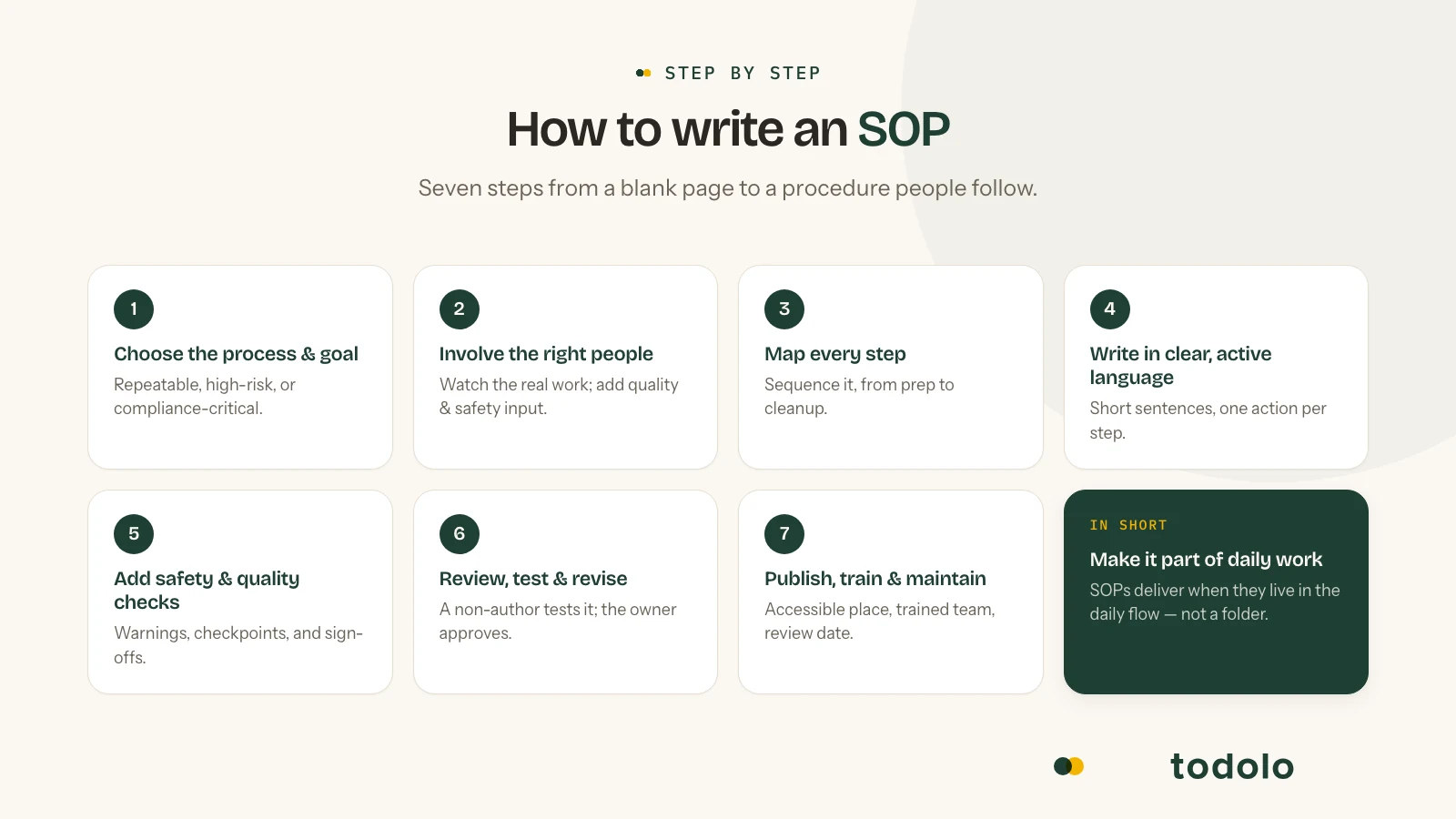
How do I write an SOP? Follow this practical process so your procedure is clear, accurate, and usable.
Step 1: Choose the right process and define the goal
Pick one process that would benefit from a written procedure. Good candidates are ones you repeat often, that carry risk, or that you need for compliance. Define the goal: what should happen when the SOP is followed correctly? That keeps the scope tight and avoids vague or overlapping documents.
Step 2: Gather information and involve the right people
Observe the process as it’s done today and talk to the people who actually perform it. They know the real sequence, the pitfalls, and the shortcuts. If the procedure touches regulated or high-risk areas, get input from quality, safety, or compliance. Building on real practice improves accuracy and buy-in, and it supports the kind of experience and expertise that auditors and customers look for.
Step 3: Map the process and list all steps
Write down every step in order, including preparation and cleanup. Don’t skip “obvious” steps; what’s obvious to you may not be to a new hire. Use a simple flowchart or bullet list first, then turn it into numbered instructions. This is the backbone of your SOP example content.
Step 4: Write in clear, active language
Use short sentences and active voice (“Close the valve” not “The valve should be closed”). Avoid jargon unless you define it. One action per step makes the SOP easy to follow and easier to audit. If your organization uses a specific SOP format or template, align your wording with that style.
Step 5: Add safety, compliance, and quality checkpoints
Where relevant, insert warnings, required checks (e.g. temperature, time, sign-off), and what to do if a step cannot be completed. This turns your SOP into a reliable tool for both daily work and compliance.
Step 6: Review, test, and revise
Have someone who didn’t write it (ideally someone who will use it) follow the SOP and note anything unclear or missing. Update the draft, then get formal review and approval from the right people (e.g. process owner, quality, safety). Document the version and approval date.
Step 7: Publish, train, and maintain
Publish the SOP in a place where the right people can access it (e.g. intranet, document system, or operations platform like Todolo). Train or brief the team on the new or updated procedure, and set a review date so the SOP stays current when processes or regulations change.
Frequently asked questions about SOPs and standardized work processes
Common questions
Click a question to show the answer.
What is an SOP?
An SOP (Standard Operating Procedure) is a documented work routine that describes how a specific process or task should be carried out in an organisation. SOPs are used to create clarity, ensure quality, and help employees follow the same way of working regardless of team, site, or shift.
Many companies use SOPs for onboarding, quality assurance, safety routines, operational processes, and day-to-day workflows.
Why are SOPs important for businesses?
SOPs help companies build more structured and consistent work processes. When routines are clearly documented, it is easier to onboard new employees, reduce misunderstandings, and make sure critical processes are done correctly.
For growing organisations, SOPs can also improve quality, efficiency, and follow-up while reducing reliance on informal, verbal knowledge transfer.
What should an effective SOP include?
An effective SOP should clearly describe the purpose of the process, which steps to perform, who is responsible, and which routines or checks must be followed.
Good SOPs are:
-
easy to understand
-
easy to follow in daily work
-
kept up to date
-
and available to the right people
Many organisations now use digital SOP systems to bring routines, checklists, and documentation together in one place.
How do you implement SOPs in an organisation?
To implement SOPs effectively, start by identifying critical processes and documenting how work is actually done in practice. Then make the SOPs available to the team through clear workflows, onboarding, and follow-up.
It is also important that SOPs do not become static documents only: they should be used actively day to day through checklists, tasks, and operational routines.
How can digital SOP systems improve operations?
Digital SOP systems make it easier to gather work routines, instructions, and processes in one place where staff can quickly find the right information. That improves structure, onboarding, and follow-up while reducing dependence on paper, scattered files, and manual steps.
For companies with several teams or sites, digital SOP systems can also help standardise ways of working and improve visibility into how routines are followed.
How do companies use SOPs for onboarding?
Many companies use SOPs as a core part of onboarding so new employees understand routines, processes, and responsibilities faster.
By combining SOPs with checklists, training material, and tasks, organisations can create more structured onboarding and shorten the time it takes for new hires to become productive.
What are the most common mistakes when working with SOPs?
A common mistake is that SOPs become too complex, hard to find, or are not updated when the business changes. Many companies also document processes without making sure the routines are actually used in daily work.
Another frequent issue is that different teams work in different ways without clear standardisation, which can lead to misunderstandings, quality gaps, and inefficient workflows.
How do SOPs work in multi-site companies?
For companies with several sites or business units, SOPs help standardise processes and clarify routines across teams and locations.
With a central digital system, everyone can work from the same processes while local routines and adaptations are still managed in a structured way.
Make SOPs Part of Daily Operations
SOPs are most effective when they become part of daily operations rather than static documents.
Learn how Todolo helps businesses manage SOPs, workflows, onboarding, and operational processes in one platform.
Explore Todolo Operations Software
Want SOPs people actually use?
In 20 minutes we’ll cover building, following, and improving SOPs — without the heavy feel.